Message models
Arguably the most widely used specification type in Semantic Treehouse is the message model. This section explains the concept, how it is positioned in the semantic architecture and points to how to create and edit them.
What is a message model?
The message model notion is a central concept in Semantic Treehouse and it offers several functionalities to create and customize message models, and to generate technical artefacts that can be used in practice.
The term message model is used as a synonym of the term 'application profile' as in the following definition:
"An application profile is a data exchange specification for applications that fulfill a particular use case. In addition to shared semantics, it also allows additional restrictions to be imposed, such as recording cardinalities or the use of certain code lists. An application profile can serve as documentation for analysts and developers."
Sources: Data Vlaanderen (NL language), Data Spaces Blueprint (EN language).
Creating and editing a message model
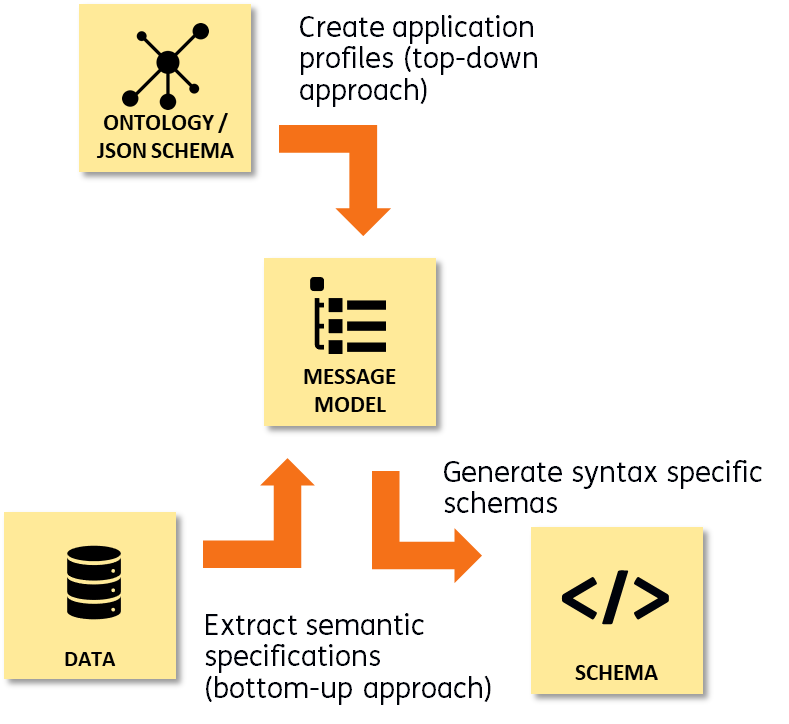
Message models can be created in two ways: bottom-up or top-down.
- Top-down: Semantic Treehouse offers a way to use the knowledge from domain knowledge such as ontologies or JSON schema documents and create an application profile for a specific use case.
- Bottom-up: Alternatively, in the case where there is only data instances and no formal schema is provided, we offer the bottom-up approach to create a new message model from a data instance.
The figure below illustrates the central role the message model, or application profile, plays in defining a new semantic interface.
The main way of editing the message model is by the STH Wizard. The wizard aims to:
- Lower barriers of using existing semantic models and standards.
- Shape application profiles based on these semantic models.
- Generate machine-readable specifications according to open standards that can be used for software development (JSON schema, XSD, SHACL, ...).
The process of creating and editing a message model is described in the Wizard section.
An example of a message model
The example below shows an example of a message model in the domain of the flexible staffing industry. It formally describes the information about the assignment of a person to a certain company looking for flexible staff.
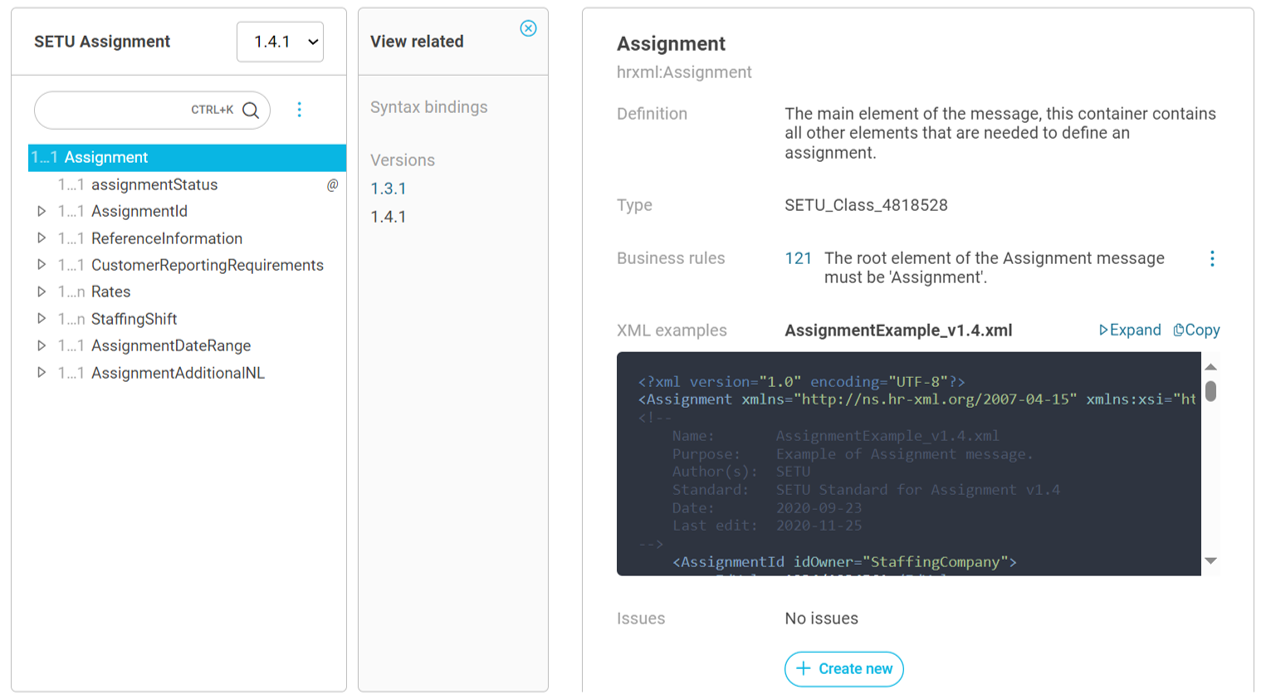
This message model has two versions, and it was derived from an ontology that holds a conceptual model of a bigger part of the whole staffing industry.
Managing versions
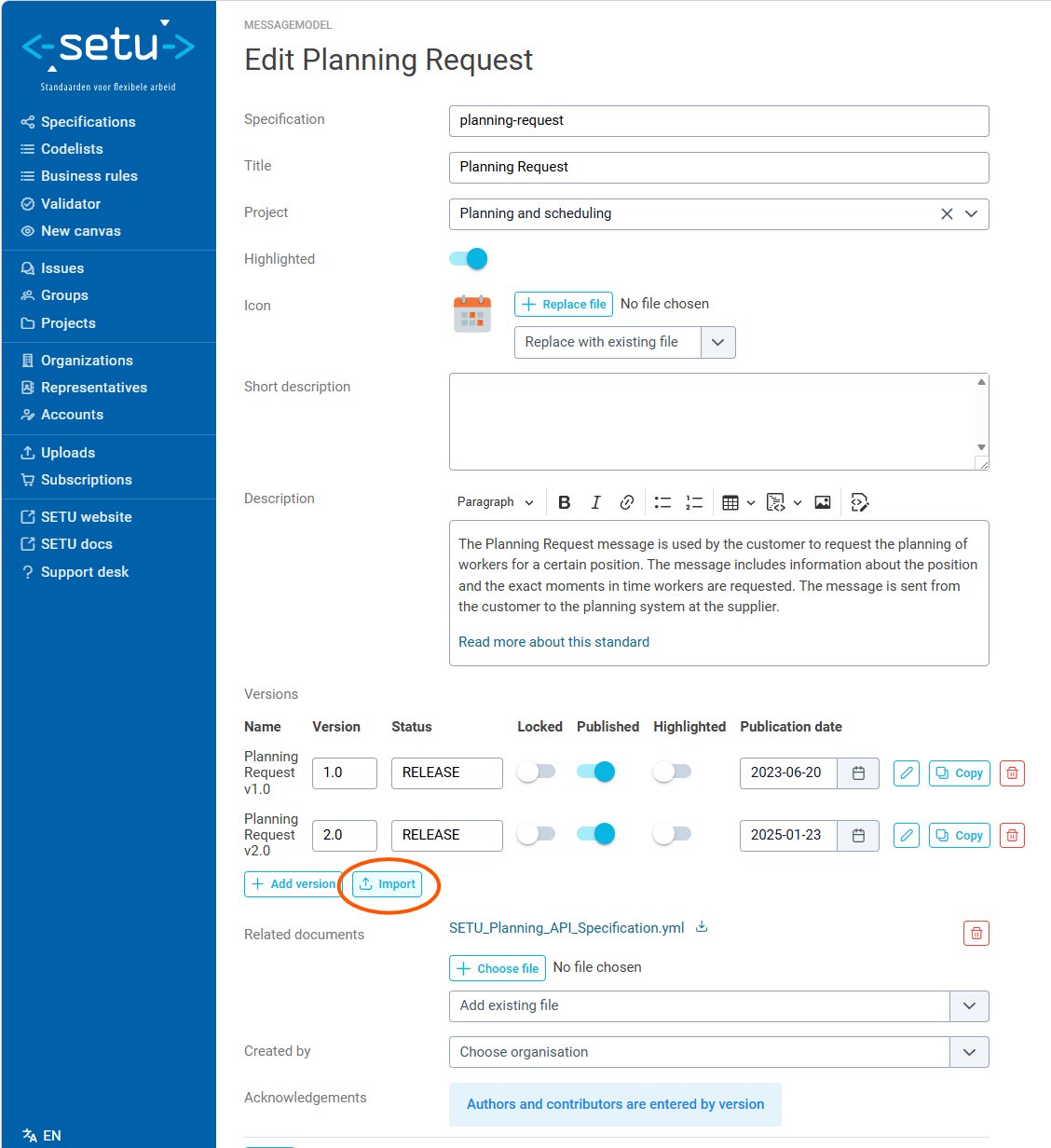
Like most specification types, message models support multiple versions. Each version holds the actual element tree and can be independently locked, published and highlighted. For general version management (creating versions, setting status, locking, publishing), see Manage specifications.
Key version management actions for message models:
- Lock a version to prevent accidental changes to a stable release. Only the latest in-progress version should typically be unlocked.
- Publish a version to make it visible to users with the User role. Unpublished versions are only visible to maintainers.
- Highlight a version to make it the most prominent in the specification overview.
- Copy a version to create a copy that serves as the starting point for a new release. The new version tracks its predecessor so version lineage is preserved.
Message model elements
A message model version consists of a tree of elements that define the structure of a data exchange message. The root element represents the message itself, and child elements define the fields and nested structures within it.
Each element has properties including:
- Name — the local name of the element (e.g.
InvoiceNumber,BuyerParty). - Namespace — the namespace URI the element belongs to.
- Definition — a human-readable description of the element's purpose.
- Multiplicity — minimum and maximum occurrence (
multMin/multMax), e.g. 1..1 (mandatory, single), 0..n (optional, repeating). - Type, also called target class — the semantic type class URI of the element, e.g. refering to a class from a reused ontology or JSON Schema.
- Datatype — the base datatype URI for leaf elements (e.g.
xsd:string,xsd:date), empty for aggregate/container elements. - Is attribute — whether the element represents an XML attribute rather than an element.
- Usage notes — additional guidance for implementers.
- Constraints, such as business rules, allowed values and codelists.
The element tree can be explored and edited interactively through the tree canvas view, or constructed using the Wizard.
Importing a message model version
Message model versions can be bulk-imported from a YAML file. This is useful for migrating specifications from external systems or for programmatic generation of message models.
To import a message model version:
- From the edit page of a message model, navigate to the message model import page by clicking the Import button below the versions overview.
- The Specification ID is pre-filled.
- Enter a Version label (e.g.
1.0.0,2.3). - Upload a
.yamlor.ymlfile containing the element tree. - Click Import — a new version is created on the existing specification.
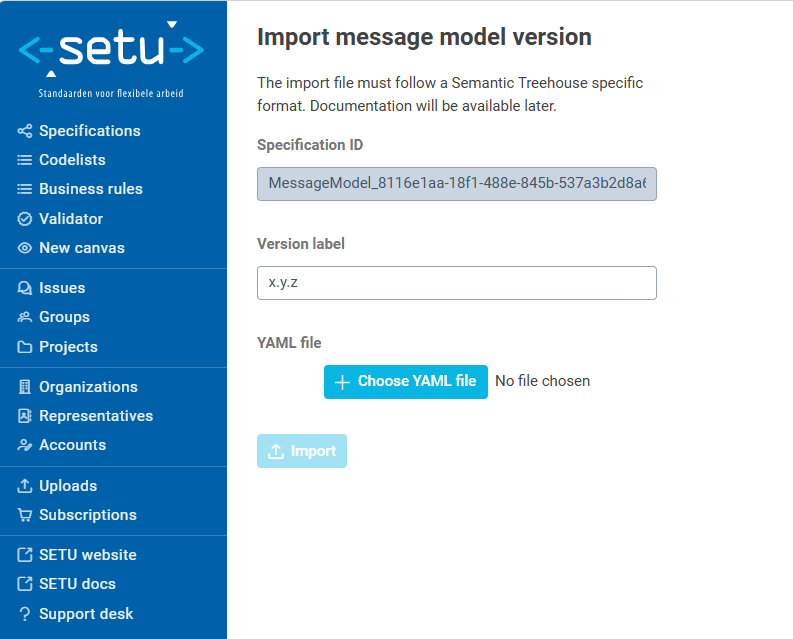
The YAML file must contain a flat list of elements that form a tree via local_id / parent_id references. Each element supports the following fields:
- local_id: "doc:Order"               # Required — unique ID within the file
  parent_id: null                     # null for the root element only
  name: "Order"                       # Required — element name
  namespace: "urn:oasis:names:..."    # Namespace URI
  definition: "The root order element"
  multMin: 1                          # Minimum cardinality
  multMax: 1                          # Maximum cardinality (use 'n' for unbounded)
  isMessage: 1                        # 1 for the root message element, 0 otherwise
  isAttribute: 0                      # 1 for XML attributes, 0 for elements
  isVisible: 1                        # Whether to show in the editor
  isRef: 0                            # Whether this is a reference to another spec
  baseDatatypeUri: ""                 # W3C XML Schema datatype URI (empty for aggregates)
  classUri: "urn:oasis:...#Order"     # Semantic type URI
  notes:                              # Optional usage notes
    - note: "Additional guidance"
  businessRuleHumanIds:               # Optional — links to existing business rules
    - "BR-001"
Importing a message model version requires an administrator role. The import creates a new version — it cannot overwrite an existing version.
Business rules referenced by humanId must already exist; missing references are reported as warnings but do not block the import.
The YAML import format described above is an early implementation and is subject to change. A more standardized import format is planned but not yet scheduled. If you build tooling around this format, be prepared to adapt when the format evolves.
Export formats
Message models can be exported to multiple machine-readable formats through the Wizard's output step. The following formats are supported:
| Format | Description |
|---|---|
| XML Schema (XSD) | Russian Doll or Venetian Blinds style |
| JSON Schema | JSON or YAML format, both schema styles |
| RDF/SHACL | SHACL shapes for RDF validation |
| RML / YARRRML | Data mapping rules for XML and JSON sources |
| OpenAPI (OAS) | API specification in YAML or JSON |
| Graph Pattern (SPARQL) | For use with the Knowledge Engine (experimental) |
| Example messages | Sample XML, JSON, or RDF instances |
For detailed documentation on each output format and its configuration options, see Wizard Step 3 — Generate output.
Validation
Message models can be validated using the built-in validator. The validator checks incoming messages against the structural schema (XSD, JSON Schema) and any business rules with Schematron implementations that are linked to the model's elements.
For details on configuring and using the validator, see the Validator documentation.
Related features
- Mappings — create alignments between elements of different message models.
- Business rules — define and manage validation constraints linked to message model elements.
- Codelists — manage controlled vocabularies used by message model elements.
- Ontologies — use ontologies as source input for creating message models via the Wizard.